We're Parents

  • Home
  • About Us
    • About Us
    • Privacy Policy
    • Contact Us
    • Disclosures
    • Media Kit
  • Parenting
    • Pregnancy and Postpartum
    • Breastfeeding
    • Car Seat Safety
    • Mental Health
    • Babies
    • Toddlers
    • School Age
    • Older Kids
    • Holiday Crafts & More
    • Green Living
  • Recipes
    • Breakfast
    • Lunches
    • Dinner
    • side dishes
    • Crockpot
    • Desserts
    • Lactation Recipes
    • Snacks
    • The Seasoned Kids (Recipes by Kids)
  • Travel
    • Kid Friendly Outings
    • Restaurants
    • Travel Tips

Unplugging Work to Keep Your Relationship Thriving

January 30, 2016 by Larisha Campbell 4 Comments

unplugging work

Affiliate Links Contained within this post.

It was about a year ago. I was busy typing away, and I noticed Andrew sort of pacing back and forth.  I had noticed this a few times in the week or two prior to this time too. I asked him if everything was okay and he mumbled yeah.  I could tell something was up. I closed my computer, left my phone beside it, and went into the kitchen.  “What’s going on, babe”, I said.  He replied, “you are alwayyyyysssss working.”

I immediately thought to myself “of course!  I have so much to do!  I just got the kid to bed (at the time I was still pregnant with our second) and I probably only have an hour or two before she wakes up and wants me to come lay with her until she feels back to sleep again. This stuff isn’t going to do itself. 

He continued. “I’m happy that you have something that is bringing money in and that you love doing.  But I feel like we don’t spend time together anymore. You always have your nose in your phone or you’re on your computer. I’d like to lay with you and watch a movie.“

It hit me like a brick.

While Andrew has always been very outspoken about his feelings, I completely missed cues that he had been giving me for weeks.  Begging me to pay more attention to him and spend more quality time together. I completely blew him off and actually recounted a few times that I got mad at him for trying to tickle me or constantly interrupt me while I was focused on some task that could have waited until later.

As mothers, especially those of us running our own businesses, even more especially those of us that solely work from home, we feel the need to constantly “be on” all the time.  Our children demand so much of our day time that when we finally get “down time” we try to rush to do all our work during that time. In the blogging world, there’s also FOMO (fear of missing out).  Fear that we are going to miss an opportunity for money or not be first to apply for a new sponsored post.

But we have to stop.  No matter your occupation, but especially those of us bloggers, we have to unplug to keep our relationship thriving.  I promise you that if you do nothing but work and stop paying attention to your relationship, that it will suffer.  It’s inevitable. It was hurting our family and our relationship and I had to stop.  I had to start doing these three things:

#1 – Get into a mindset that you don’t always have to “be on”.  If you do miss out on something, then it wasn’t meant to be.  Something greater will come along.  I promise, it always does.

#2 – Realize that 9.5 out of 10 times nothing needs to be immediately done.  The e-mails can wait.  The course that you are taking will still be there.  The photos can wait until tomorrow.

#3 – Learn to time block.  I’ve been doing this for years now but never knew what it was called until Amiyrah from 4 Hats and Frugal called it that.  Make a list of everything you need/want to get done in a day. Set an allotted amount of time.  When you have a few spare minutes, set a timer, and do that task. You have more time in your day than you realize, but you have to utilize it to work for you.  Work the minutes to YOUR advantage.

So, how did I fix our relationship and get it thriving again?  I say fix because I had really caused a strain in our communication and it did need fixing.  A piece of having a partnership is that you have to recognize and fix what you’ve done to another person.

#1 – All electronics are off for at least an hour after he gets home. We chat about our days, tell a funny story that we may have heard, make a snack together, etc.

#2 – Date nights. Now, we have two very small children, we are on a strict budget, and we don’t have family nearby.  So we are limited right?  No!  I came up with 26 at-home date night ideas and gave it to him as a Christmas gift.  He was so excited.  From finding a dessert together on Pinterest and making it, to watching a favorite movie of his that I’ve never seen, to making ice cream together, I came up with fun ideas that we would like doing that would make us be together without electronics involved.

#3 – During the weekends when he is home or days that he is off, I try to limit my phone time to only when the baby is nursing.

#4 – When we go on weekend trips or out of town, we don’t bring electronics.  We do bring phones, but we rarely use them unless it’s just during a wind down period.  We try to focus on each other, our time with our family, and the experience we are having.  I encourage you to do this even for a family function, try leaving your phone in the car.  You’ll be amazed at how much you don’t even need it.

We are in such a great place now and I’m so thrilled with it. I highly encourage you to listen and be aware if you are always plugged in to your work.  Even if your significant other isn’t expressing it, they are yearning for your attention.  Figure out how you can unplug while they are around and get (almost) everything done when they aren’t home. Unplugging work to keep your relationship thriving is vitally important to our families.  Let’s make it happen.

Filed Under: Blogger Tips, Home Tagged With: blogger tips, blogging

5 Tips for Picking the Perfect Blog Name

April 11, 2015 by Larisha Campbell Leave a Comment

picking the perfect blog name

Most people I know, including myself, struggled with choosing a name for their child. Some people I know didn’t even have names until well after their children were born.  We struggle with this decision because it’s something that will stay with our child for the rest of their lives (unless of course they decide to legally change their name later). It’s a HUGE decision.  Picking a blog name should be no different.  This is a name that will stick with you (unless of course you decide to rebrand) for the rest of your career.  Even if you do decide to rebrand at some point, many people will still remember you by the first name for a long time.

When people ask me what the first step is in creating a blog, I tell them that deciding and finalizing a name should be the very first thing they do, but even then, there’s steps to take to make sure that it’s really perfect.  Here I discuss 5 Tips for picking the perfect blog name.

1. Originality

  • The name you decide on should be 7 things – Short, Catchy, Memorable, Easy to Say, Easy to Spell, Easy to Pronounce, and most important ORIGINAL.
  • Start by brainstorming – write down a list of topics that you want to write about.  Then use a thesaurus to figure out other words that mean the same thing are your topics.  Add in verbs and nouns that describe the site and then work on creating the perfect combination of your brainstorming list.

2.  But not TOO original

  • This falls in the easy to say and spell, but needs it’s own point.  Don’t add weird characters like “MomZ Club” because someone already has Moms Club. The same goes for adding numbers and symbols into your name.  You want something that’s easily memorable and anyone will be able to find it when searching. If someone has to remember that you added a 3 instead of B – like 3eautiful 3log – chances are you will never be found.

3. Decide if it can really grow with you

  • Sure – “Mom of 10 Boys” sounds like something a lot of people would be interested in, but if you aren’t done having kids and #11 happens to be a girl, your name because a little weird. Also, if you are creating something very specific make sure that that’s all you ever plan to write about.  You may love to eat vegan and you may love to cook, but “Vegan Chef” limits you to what you can write about – if you suddenly weren’t vegan anymore you’d have to either consider selling or just not using the site anymore.  Pick something that can really grow with you.

4. Your domain is available

  • You can do a simple and quick check on GoDaddy.com to see if your domain .COM name is available.  Many people can have successful blogs with .Net, but ultimately you really want .COM.  It’s easier and the most common way people search for things. You also want to make sure that someone isn’t already using the .Net or .Org version of your same name.
  • If you are thinking of creating a blog, do me a favor.  Buy your domain BEFORE you start.  Don’t fall into the “free” trap of yourblogname.blogspot.com or yourblogname.wordpress.com.  Not only do these not look professional, but if you are serious about blogging, it makes you look like you are and saves you the hassle of switching later (and trust me, you will switch later if you stick with it).  It’s a very small investment usually.  Unless someone already owns the domain you want, you can typically buy your domain for under $20/year.  That’s less than the cost of 5 Starbucks drinks.  A small sacrifice.
  • If you do have the extra money, buy the .Net and .Org versions too to ensure no one else can
  • One more thing — THIS IS A BIG ONE — make sure that your name together doesn’t create any awkward phrases.  There’s a local restaurant that a blogger I know goes too that’s named Han Dynasty.  However – handynasty.com – isn’t exactly what I think they want people to see when they push the words together for a website or hashtag.

5.  It fits and is available within social media parameters and e-mail limits

  • Hopefully, by now, you think you’ve discovered the perfect name.  But there’s one more CRUCIAL step.  You need to make sure the name is available on social media, as well as an e-mail.  There’s actually a neat website that tells your if a name is taken across social media site, though I’m not sure how accurate it really is.
  • Twitter has a limit of 15 characters, Instagram is 30, Facebook is 50.  You ideally want ALL of them to match exactly.

I, personally, made a lot of these mistakes, and I’m writing this to hope that you can learn from my mistake.  My domain wasn’t available as just wereparents.com so now it’s wereparentsblog.com and I don’t really LOVE it.  I also made the e-mail mistake and I have an awkward e-mail that’s hard to remember.  Good luck in naming!

signature button


blogger tips tricks and resources


This post is part of our Blogger Tips, Tricks, and Resources series.


Filed Under: Blogger Tips, Blogging 101, Home Tagged With: blogger tips, blogging, blogging 101

Walk Away From Blogging

February 28, 2015 by Larisha Campbell Leave a Comment

Photo adapted from IdPinThat

Photo adapted from IdPinThat

Wait…Did you really just read a title that says Walk Away From Blogging?

Yes…Yes, you did.  But why in the world would you want to do that? Is it even possible?  What happens?

Life goes on.  That’s what happens.  The internet keeps spinning.  You will likely keep getting some pageviews, albeit maybe a drop off depending on how long of a break you take.  But most importantly, you have time to regroup and get your life back on track.

Let’s rewind.  A little over two years ago, I started blogging for fun.  It was new and exciting, and every single pageview that I received gave me a high.  People were actually reading what I was writing (Who cares if it was probably just my mom, aunt, and sister’s cousin’s best friend).  It was all just very fascinating to me.  I kept writing.  For some God awful reason, I read that I should be writing everyday and so I tried to do that–even after having my first child just 5 months after I started blogging.  Some months I published over 50 posts.  I was exhausted, not making a lot of money, and didn’t even feel like I was spending valuable time with my family.

So I walked away.  For a week.  And it was the best decision I ever made.  Since then I’ve done it two other times.  Most recently was last week.  I didn’t plan to do this last week, but being pregnant with a toddler, after just moving my entire site from Blogger to WordPress, taking a on-line blog class, and overall life, I desperately needed a break.

I don’t even know if anyone notices when I do this.  My pageviews seem to hold pretty steady at this point thanks to some viral posts I have lingering the internet.  But what I do know is that even with just a week break, I come back refreshed, energized, and ready to work again.

I think it’s vitally important for your sanity, that whenever you are feeling burnt out, you just simply take a break.  Don’t worry if pageviews drop for a few days, don’t worry if a few people notice, just worry about you.  And your family.  Focus on life and what makes you happy again and when you do decide to return, everyone will be much happier.

Have you ever taken a break?  Was it helpful?

signature button

Filed Under: Blogger Tips, Blogging 101 Tagged With: blogger tips, blogging

How to Use Keyword Planner in Google

February 7, 2015 by Larisha Campbell 1 Comment

how to use keyword planner for seo

When I started blogging a little over 2 years ago, I just wrote.  I had no idea what keywords or SEO was, and I darn sure didn’t know what Google’s Keyword Planner was or how to use keyword planner to benefit my site.  It took me almost a year to figure out that I should really be using a plethora of tools to optimize my site for more than just fun. I found Google Adwords by mistake and have been in love ever since.

Up until just a few weeks ago, I was still on the Blogger platform and Keyword Planner made it easy to figure out what keywords I should be using to optimize for SEO.  Now that I’ve switched over to WordPress, the Yoast plugin significantly helps, but it’s still not 100% perfect.

For the purpose of this post, we’re going to use the keyword ‘bacon’.  Who doesn’t love bacon? In Yoast, if I just type bacon, it gives some searches, and while you might think this is the order that most people search, the Keyword Planner gives a completely different view.

how to use keyword planner in Yoast

So let’s chat first about how you use Keyword Planner.  When you go to Google Adwords (you may need to first log-in to your Google account), click on Tools, then Keyword Planner, then Search for New.  Google Adwords is actually to set up ads for potential customers, but we are only talking about the Keyword Planner for SEO in posts here. 

using google keyword planner

You will then wants to type in your search word(s) and check your filters.  You may want to compare a specific date range, add a different language, or target country, depending on where your readers are located.

how to use google adwords

When the keyword planner first searches for your term(s) you will see two things.  How many people searched for your term on an average monthly basis depending on your date range.  For this particular keyword, you’ll see that for the past 12 months, on average, “bacon” is searched for 90,500 times a month. This is actually a lot lower than I expected for bacon. The search is loaded by Keyword (by relevance), but click on Avg. Monthly Searches to order the keywords by the number of times they are searched.

how to use google keyword planner

Once you click that, you will see that most people are searching for a variation of “bacon in the oven”.  If you focus on “bacon”, you should absolutely have a post that covers this and use one or multiple of the top three variations within your post.  There’s nothing that says that you can’t use more than one keyword, but try to use the main one as many times as naturally possible.  You will also get other ideas on what people are searching for in order to do future posts.  So maybe your first post is about how to cook bacon in the oven, but next week you also might want to do a post about bacon wrapped chicken, and make sure that again you using “bacon in the oven” within your post.

As you can see in the first image, if you are using Yoast “bacon wrapped dates” shows second, making you think that is more searched than others, but according to Google Adwords, it’s actually the 9th most searched terms relating to bacon.  It’s important to look at both in my opinion when learning how to use keyword planner.

Lastly, play around with your date ranges.  When I opened the date from 12 months to 24 months, you can see that most people are searching for “bacon” during November to January.  You want to make sure that if you are using specific keywords for your site on a regular basis (which you should be), that you are using these optimal times to push both new and old content.


google keyword planner best time to post

I know this was a basic overview of how to use Keyword Planner within Google Adwords, but I truly hope that it helped.  Make sure that you have a specific set of keywords that you regularly use on your site and then for each post you should be using specific keywords to optimize your site to show up in Google search engines.

signature button


blogger tips tricks and resources


This post is part of our Blogger Tips, Tricks, and Resources series. You can learn more about this series, learn how you can submit a question to be answered, or learn about how you can submit a guest post to be included in this series by viewing our Introduction to Blogger Tips, Tricks, and Resources Post.


Filed Under: Blogger Tips, Tutorials Tagged With: blogger, blogger resources, blogger tips, keywords, seo

10 Blogger Mistakes That Could Be Illegal

January 31, 2015 by Larisha Campbell 12 Comments

*Disclosure: Affiliate links contained within this post.  I am not a lawyer and my post herein are simply my thoughts and opinions based on research that I have done for myself.  If you believe that you may be in legal trouble, we suggest contacting a lawyer.
illegal blogger mistakes

Whether you’ve been a blogger for a week, a month, a year, or 10 years, there are chances that you may be making mistakes that you simply don’t know are wrong. Some things should, in all honesty, be common sense, but there are other topics, especially when it comes to social media’s every changing policies, that you just haven’t heard of yet. There are also cases where a blogger knows they’re doing something wrong, but simply don’t care…that’s a rant for a different day though.  I’ve worked to gather some of the most common blogger mistakes that I see or hear happen on a frequent basis.

10. Plagiarism.  This seems like a topic that I shouldn’t even have to discuss.  I’m pretty sure that everyone learns that you shouldn’t plagiarize in elementary school, which is then only reinforced through high school and college.  You should not be copying word for word (whether an entire post or even a paragraph from ANY press release, other website, or another blogger.  Of course you can quote others, but you must do it properly. You can check out the Online Writing Lab at Perdue for tips.

can't ask for click thrus

photo shot captured from IZEA website Terms

9. Participating in “click my sponsored link” help threads. This one is actually new to me. Partly because I rarely participate in “pay-per-click” sponsored programs. However, if you are using programs such as IZEA, Linqia, and others, it’s actually written into your Terms Of Service that you cannot manipulate click data.  By asking others to click on your links, which you in turn get paid for, is skewing that data.  Remember, these programs are about driving organic traffic.

8. Hosting an illegal giveaway. Whether you’re a blogger that hosts a giveaway once a year or everyday, you really need to be up to date on giveaway rules and regulations.  This topic is entirely to long to cover in this post, but some important considerations are:

  • Figure out whether you are running a giveaway or a lottery
  • Not creating rules
    • All giveaways must have rules.  The rules must include things like “no purchase necessary”, how a winner will be chosen, who the giveaway is open to, and what the exact prize is.
  • Not following the rules
    • Once the contest starts, it’s illegal to change anything about the giveaway.  This includes changing the day or time your giveaway ends
  • Ignoring laws for other countries if hosting a “Worldwide Giveaway”
    • One example of this would be that most Canadians must take a “skill test” of some sort before entering a giveaway, like a math question.  We won’t even get into Quebec’s laws.
  • Giving away something valued at more than $600 and not ensuring a 1099 form was sent to the winner
  • Not having a “FREE” entry.  Everyone that wants to enter should have the ability to do so without any additional requirements.

7. Taking images from Google and others. I’ll admit it.  When I first started blogging, I, for whatever reason, didn’t even consider this.  I knew not to take images from other people, but I definitely thought it was okay to take images from Google.  Isn’t this  like a “common” marketplace? NO!  It wasn’t until I learned that a blogger was sued for $8,000 for taking an image.   Don’t worry if you’ve been doing this.  Simply, go back through your old posts and fix them to include images that you can use.  You should be:

  • using your own images as much as possible

    The-Best-Free-Stock-Photos

    photo credit: A Grande Life

  • finding places that do legitimately offer free stock photos
  • as a last resort, if you find a photo somewhere that you truly want to use, contact that person as ask them.  You’d be surprised at how many people would allow you for linking back to their site


can spam act

photo shot captured from FTC website

6. Selling or giving away e-mails. Whether you literally sell someone’s e-mail or your exchange an e-mail list to a brand after receiving a product and running a giveaway, you are doing so illegally.  The CAN-SPAM Act fines violators of their terms up to $16,000 for EACH violation.  Nothing is worth that. At the same time, you also cannot buy a list to use yourself and you must have an option to opt-out for people who legitimately signed up for your blogger e-mails.

no follow

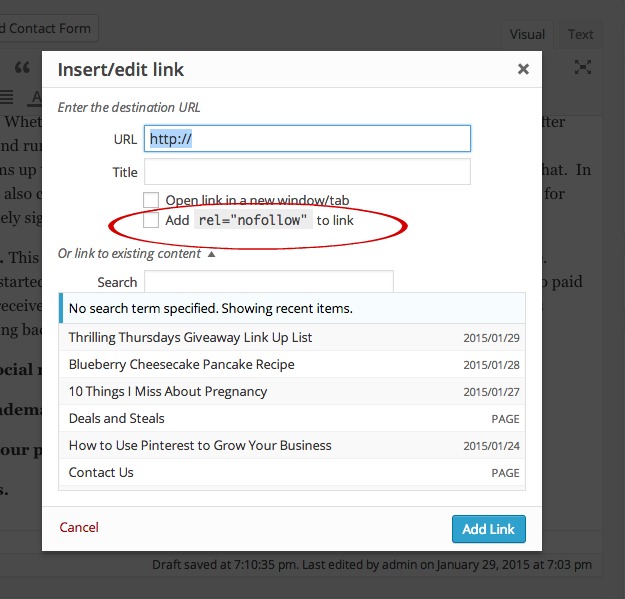
5. DoFollow Links. This isn’t necessarily illegal; however, it is against Google’s Terms of Service. While I have no evidence, we’ve heard that Google will blacklist you from their search engine if you continuously allow dofollow links for paid posts.  Nofollow links were started when spamming started becoming an issue and since is now applied to paid links.  Whether you received products in exchange for a post or monetary compensation, any links within that post linking back to the person who paid you should be made nofollow. It’s easy in both Blogger and WordPress to just click nofollow to make your links correct.

terms of service

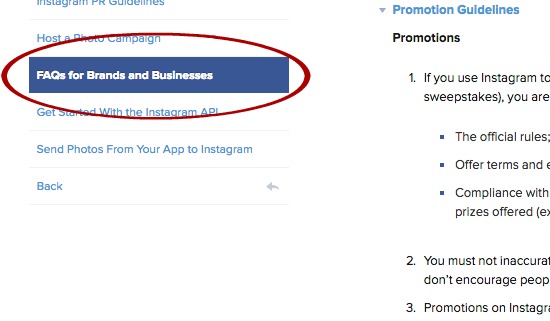
4. Not following social media TOS. This also isn’t necessarily illegal, but by not following a social media platform’s Terms of Service (TOS) as a blogger you run the risk of that site shutting your page down.  Imagine have 30,000 Facebook fans, and having your page shut down for not following something.  This is one of my biggest pet peeves.  Facebook is the most strict with their terms, but all Social Media sites have their own Terms you should be following. Some of the most common violations I see are:

  • Hosting an Instagram giveaway without releasing Instagram from association. Same goes for almost all other platforms as well.  You must have a “I release ‘said platform’ from liability…yadda ya”
  • Hosting a “Pin it to Win” It Contest
  • Asking someone to share something on their personal FB page OR sharing your OWN giveaway on your personal page.
  • Requiring that people Pin a specific pin
  • Asking someone to LIKE your Facebook page.
  • Asking someone to like you on Pinterest
  • Asking someone to TAG a friend in a post to enter a giveaway.

All social media platforms TOS can be found easily on their websites.

3. Using trademarked terms in advertising. This is a very slippery slope and I highly recommend that if you are going to be mentioning any brands within a post or image that you try to use generic terms instead of brand names.  Understanding trademark vs generic is important and confusing because sometimes a trademarked term has become generic – Xerox is an example of this. If you must use a brand name it should alway include a ® or TM symbol after the term.

trademarked terms

One of the most infamous of all trademarks involves not being able to say “The Super Bowl” in any advertising.  Instead you’ll see people referring to “the big game” or “championship game”.  The NFL is notorious for protecting it’s trademarks.  On the same note “March Madness”, “Olympics”, and “World Cup” are all similarly trademarked and protected.

If you are truly set on using a specific brand within a post, I highly recommend reaching out to the permissions department or PR department and working with the company directly.  Often, if you are running a positive piece, you will get permission to do so.

ftc disclosures in posts

2. Not disclosing your partnerships. The FTC is VERY clear that you have to have disclosures wherever you are placing an ad.  Whether you were paid to post something on social media or wrote a sponsored post after received monetary or product payment on your website- as a blogger you are responsible for making sure that you know these .com disclosures.

ftc disclosures

The big key points are:

  • On social media, you should be placing the term #ad or #sponsored at the beginning of your message or before ANY links
  • In a sponsored post on your website, you must disclosure BEFORE any links occur in your post AND at the end of your post because of the post length.

file5801241837386

1. Not paying taxes.  The is the bread and butter of the the biggest illegal mistake that a blogger could be making.  I’ve heard so many people say, “Well, I didn’t make more than $600.” It doesn’t matter.  If you make $5 or $500,000, you are legally required to pay taxes to the IRS.  This topic is entirely to long to cover here but if you received any form of compensation whether cash, check, a Giftcard, or a product…YOU MUST pay your taxes.

While, this is not an exhaustive list of blogger mistakes that you may or may not be making that could be illegal, it’s a great place to start and evaluate how you are doing. Take the time to make sure that you and your site are free from liability down the road by protecting yourself as a blogger today.

Please weigh in below on what you think I missed or you had no idea about!

blogger tips tricks and resources

This post is part of our Blogger Tips, Tricks, and Resources series. You can learn more about this series, learn how you can submit a question to be answered, or learn about how you can submit a guest post to be included in this series by viewing our Introduction to Blogger Tips, Tricks, and Resources Post.


Filed Under: Blogger Tips, Blogging 101, Ethics Tagged With: blogger, blogger mistakes, blogger tips, illegal

How to Use Pinterest to Grow Your Business

January 24, 2015 by Larisha Campbell 11 Comments

How to Use Pinterest to Grow Your business

Pinterest when used properly can be one your website’s highest referrers for traffic. For many though, the phrase “when used properly” can be source of confusion – “Isn’t Pinterest just “pinning” website links and pictures?” Hardly!

Pinterest is optimized for SEO (search engine optimization) searches on their website, as well as showing up in Google. You want to make sure your Pinterest boards and pins are keyword rich to ensure your pins are the ones that come up in your follower’s searches.

Your Pinterest “About” section

Pinterest gives you 200 characters to succinctly describe who and what you are. Keep your website’s keywords the highlight of the overview. Not sure what your keywords are? Your Google Analytics on your website will tell you that information. What words and phrases are people searching for?

Be sure to include your website’s link for followers to easily click to your website. The check mark next to my website means Pinterest has verified my website and now allows me to include my social media links and add Pinterest widgets and buttons on my website.

You are losing potential future website readers if you do not have a “pin it button” on your website or photos on your website. By doing so, your readers are marketing for YOU by including a back-link to your website on their Pinterest account.

How to use Pinterest to grow your blog

I’d suggest using your website’s logo as your profile picture. Keep your profile picture in line with your business and what you represent.

Your Pinterest Boards

When you first create your Pinterest account, Pinterest will give you suggestions on board names. They are very generic though and often not in line with your website’s SEO and keywords. Create your boards with this in mind. Each board allows you 500 characters to create a keyword rich description on what the board represents.

Your boards should be categorized by alphabetic order. Put a board dedicated to your website front and center. The second and third boards in your profile should be dedicated to anything seasonal, since this is what people are searching for at that given time. The first 5 boards are prime real estate.

How to SEO optimize your pins

optimizing your pinterest pins for SEO

Your Pinterest Pins

Unfortunately, Pinterest feels shortened links are spam, so always use a full link from your website. Each pin’s description should also be keyword rich.

how to use pinterest to grow your blog

Growing your Pinterest Followers

My advice on how to grow ANY of your social media network is always the same – ENGAGEMENT! In order to gain followers, you need to follow back! On a daily basis, I probably repin, like and comment on 50+ pins. When you organically share content, your followers will do the same for you. Also, think about this. When you repin content from another account, it is your account that is showing up to be followed. So, although you are referring traffic to another website by repinning, you are also helping yourself by putting your Pinterest account in front of them to be followed.

why you should repin other bloggers

Not sure of an organized way to repin? I network with tribes on Facebook and am a member of several community boards on Pinterest.

When Pinterest was first released, I remember sitting for hours pinning anything and everything that looked like something I liked or a future version of me would like. Those days are long gone. When I realized the viral power that Pinterest had over my website, everything I pinned had a clear purpose and I took the time to make each pin appealing.

Something to think about:

According to the Tailwind App, content on Pinterest stays relevant for over a week versus less than 90 minutes on Facebook and less than a half hour on Twitter. why Pinterest is the best social media platform


Your Pinterest Photos

Because Pinterest is such a visual space, you need to ensure your pictures are enticing enough for your reader to want to click on it and find out more. Think of your Pin as a “teaser”. The ultimate goal is for them to click trough to your website. If they getting everything they need from your pin’s picture, then they have no need to click through. Try using 735×1000 pixels for your Pinterest images.

best size for pinterest photos

What other tips and tricks for succeeding on Pinterest do you know?

blogger tips tricks and resources


This post is part of our Blogger Tips, Tricks, and Resources series.

This is a guest post.

Filed Under: Blogger Tips, Blogging 101, Home, Tutorials Tagged With: blogger, blogger 101, blogger resources, blogger tips, blogger tricks, pinterest, social media


We're Parents is all about cooking and traveling our way through imperfect parenting. Learn More

SUBSCRIBE TO OUR WEEKLY NEWSLETTER & GET PARENT & ME COLORING SHEETS

Connect With Us

We're Parents is a unique mom and dad natural parenting blog focusing on topics such as breastfeeding, babywearing, and car seat safety. You'll also find Delicious recipes, inspired travel recommendations, and more as you journey with us through parenting. Learn More…

VIEW OUR PRIVACY POLICY

Even More Recent Posts

a black and white photo of a curly haired african american woman in a sweater holding a new born baby while standing up.

We’re Parents is a participant in the Amazon Services LLC Associates Program, an affiliate advertising program designed to provide a means for sites to earn advertising fees by advertising and linking to amazon.com

Copyright © 2026 · Foodie Pro Theme by Shay Bocks · Built on the Genesis Framework · Powered by WordPress