We're Parents

  • Home
  • About Us
    • About Us
    • Privacy Policy
    • Contact Us
    • Disclosures
    • Media Kit
  • Parenting
    • Pregnancy and Postpartum
    • Breastfeeding
    • Car Seat Safety
    • Mental Health
    • Babies
    • Toddlers
    • School Age
    • Older Kids
    • Holiday Crafts & More
    • Green Living
  • Recipes
    • Breakfast
    • Lunches
    • Dinner
    • side dishes
    • Crockpot
    • Desserts
    • Lactation Recipes
    • Snacks
    • The Seasoned Kids (Recipes by Kids)
  • Travel
    • Kid Friendly Outings
    • Restaurants
    • Travel Tips

What I wish someone told me as a new mom

May 20, 2024 by Larisha Campbell Leave a Comment

What I wish someone told em as a new mom is a piece to all new moms on the journey of feeling like they are missing something.

a black and white photo of a curly haired african american woman in a sweater holding a new born baby while standing up.

I’m not going to lie to you. I’m going to tell you exactly what I wish someone told me as a new mom.

I see you.

You feel alone.

You probably aren’t alone, though maybe you are. But the world feels so….damn….isolating right now.

And yet, you have this tremendous task to take care of an entire human being.

Hold on. What the actual fuck?

Where is the manual? Where is the guidance? They seriously are going to let you just walk out of the hospital with a whole human being. THIS IS WILD. So many more questions to ask. What is the hotline number when I have questions? Huh? There’s not one!? I’m going to fail.

Breathe.

People ask how they can help and deep down you just want to scream. Don’t they see everything that needs done? Why are you the only one that can? No, I don’t want you to hold the baby I just birthed, I WANT TO HOLD THE BABY I JUST BIRTHED. I want YOU to do everything else.

Breathe.

The baby is crying now. I’ve changed the baby. Feed the baby. Put clothes on the baby. Taken the clothes off the baby. Sang to the baby. Baby is still crying. OH MY GOSH WHAT DO I DO!?

Breathe. Breathe. Breathe.

Over the next 18 years you are going to feel this immense joy at this tiny human that you created, while at the same time, feel like you are failing at every single second guessing moment. The pressure that society has put us in is not an easy one to deal with. Very few moms actually have the true help they need and feel supported in their motherhood journey.

What I wish someone would have told me though is not that the newborn stage is hard and it will pass quickly, but EVERY stage of parenting is hard.

So what I now say to new moms is:

  • I see you.
  • You are not alone.
  • Every stage of parenting is hard. This one will pass, but the next one is hard too, just different.

Now, let’s pause another moment to breathe.

Motherhood is also wonderful and there’s joyous moments at every stage as well. Those newborn smiles or the first words or them learning to read all the way to the first crush and beyond are all wonderful.

You are on this crazy roller coaster ride that will bring you so much joy.

But I’m not going to lie and say it’s easy.

I’m going to tell you what I wish someone told be as a new mom.

Hang in there. You got this. You’re doing great.

Filed Under: Babies, Home, Parenting, Pregnancy and Postpartum

Chocolate Peanut Butter Banana Lactation Boosting Milkshake

May 17, 2024 by Larisha Campbell 59 Comments

If you’re looking for an amazing way to increase milk production, then this Chocolate Peanut Butter Banana Lactation Boosting Milkshake is the most delicious way!

Whether you are struggling with low supply or you are just looking for a really yummy way to boost your milk production, then this Chocolate Peanut Butter Banana Lactation Boosting Milkshake is going to be exactly what you need.  I personally used this when breastfeeding both of my daughters and it was such a great way to increase production.
When I was pregnant, I knew one thing–I was going to breastfeed.  That’s all I knew. I knew it was more natural and the most economical choice as well since I’m a stay at home mom. I set a goal for 6 weeks!
Why no one in my life told me how difficult it was going to be was beyond me.  We did great in the hospital, and then It seems like the moment we walked into our house, hell broke loose.
IT. WAS. HARD. Y’ALL!!!
We did have a successful breastfeeding journey. I nursed both of our girls for 3 and 4 years, respectively. And, while we’ve had our ups and down, there were a lot more ups than there were downs.
Luckily, I was super grateful for lactation recipes. They definitely made me feel more confident in succeeding.

Watch how to make this chocolate lactation smoothie: 

Do Lactation Recipes Work?

One of the things I hear most from people who reach out to me about breastfeeding is that they are scared they won’t produce enough milk.  And my answer is always, “it’s very rare that a mom actually have production issues, however, you can take precautions and be proactive in helping your supply.” I’ve been working to create some great, easy recipes to share so moms have great options when they need them.
So how can this recipe help with lactation?
Oats and Flax are known help boost milk production, while the peanut butter is a great protein to make sure you are getting the calories you need while satisfying your hunger since you are probably stuck on a couch nursing a baby.

**Note:  If you are truly concerned about your milk production, please reach out to an IBCLC and/or your local La Leche League. You can also read our post about Lactation Boosting Foods to increase your milk supply. 

Do I have to be lactating to enjoy this milkshake?

I get this question a lot when some moms see this post shared in a Facebook group or on Instagram.  They love the combo, but they either didn’t or are no longer nursing.  The good news ….No! You don’t.

If you look at the ingredient list, there is nothing in there that the average person couldn’t enjoy.  It just so happens that the combination of ingredients seem to help lactating mothers.

In fact, Andrew has drank this milkshake on more than a few occasions. I’ve had it not breastfeeding.  And it’s a great one to give to your little ones, since it’s all natural ingredients.  Even though there’s a little bit of chocolate, it’s natural cocoa powder and we don’t use any added sweeteners.

What oats are best for lactation?

We prefer old fashioned rolled oats over quick oats.  While both are whole grains and the same product, old fashioned oats have not been processed, thus are more in their true form.

You can definitely use quick oats if you have them on hand and do not have old fashioned oats, but we do prefer the later.

Also, it’s important to note that you should not use instant oats in this recipe.  They will soak up the milk too quickly and you will end up with something more like overnight oats (delicious, but not what you want for this recipe).

Helpful Tips for this Chocolate Peanut Butter Banana Lactation Boosting Milkshake: 

  • If you do not want a “grainy” lactation smoothie, then add the oats and flax seeds first and pulse to grind into a fine powder first.  Then, add in the remaining ingredients and blend thoroughly.
  • If you are nut free, you can sub with sunbutter, but the taste will be different.  We find sunbutter a little more powerful in flavor than peanut butter, so adjust the level of cocoa or even add a splash of maple syrup.
  • Other nut butters, besides peanut butter, may also be used.
  • I’ve made it with both fresh and frozen bananas.  Both are great.  You may need to add a bit more ice with a fresh banana to make it as thick.
  •  100% Cacao is slightly bitter since there are no sweeteners. If you are looking for a sweeter taste, add 1/2 to 1 full tablespoon maple syrup.

What are other lactation recipes that I should try?

Once you try this delicious lactation smoothie, we are sure that you are going to be looking for other delicious recipes to try!  Good news, is that we have a few that are too die for.  Some, maybe even better than this recipe (is that even possible!?) Here’s some ideas:

  • Lactation Energy Bites
  • Peanut Butter Apple Pie Lactation Smoothie
  • No Bake Lactation Bars
  • Strawberry Coconut Cashew Lactation Smoothie
  • Delicious Lactation Cookies

We hope that you love these recipes!

4.91 from 11 votes
Print
Chocolate Peanut Butter Banana Lactation Boosting Milkshake
Prep Time
5 mins
Total Time
5 mins
 

This Chocolate Peanut Butter Banana Lactation Boosting Milkshake is the most delicious easy lactation recipe that you need! Drink one everyday! 

Course: Breakfast, Dessert
Cuisine: Lactation
Keyword: lactation recipes
Servings: 1 milkshake
Calories: 546 kcal
Author: Larisha Campbell
Ingredients
  • 1/4 cup old fashioned oats
  • 1 large banana, frozen preferred, cut into chunks
  • 3/4 cup oat or soy milk
  • 2 tbsp natural peanut butter
  • 2 tablespoon 100% cacao powder
  • 1 tbsp ground flax seed (up to 2 tbsp if you are really looking to boost milk production)
  • 2 cups ice
Optional Toppings
  • Whipped Cream
  • Sliced Bananas
  • Chocolate Drizzle
Instructions
  1. For a high speed blender: Add all ingredients in and blend until smooth.

  2. For a standard blender: In a blender, add the oats and give it a quick pulse. Add remaining ingredients, except ice, and blend until well combined. Add 2 cups of ice until well blended. 

  3. Enjoy with a thick straw or a spoon!

  4. *Feel free to skip the ice if you just want a smoothie.

Recipe Notes

**Nutritional facts are just estimates. Please utilize your own brand nutritional values to double check against our estimates. 

Nutrition Facts
Chocolate Peanut Butter Banana Lactation Boosting Milkshake
Amount Per Serving (1 milkshake)
Calories 546 Calories from Fat 216
% Daily Value*
Fat 24g37%
Saturated Fat 5g31%
Polyunsaturated Fat 7g
Monounsaturated Fat 10g
Sodium 121mg5%
Potassium 1036mg30%
Carbohydrates 77g26%
Fiber 14g58%
Sugar 34g38%
Protein 17g34%
Vitamin A 456IU9%
Vitamin C 12mg15%
Calcium 337mg34%
Iron 5mg28%
* Percent Daily Values are based on a 2000 calorie diet.


**The pictures below were the original pictures for this Chocolate Peanut Butter Banana Lactation Boosting Milkshake which you may have seen floating around Pinterest.  It’s the same recipe, we’ve just gotten a lot better at photography!
Originally publish May 2014. Updated in 2024.

Filed Under: Breastfeeding, Home, Lactation Recipes, Parenting, Recipes Tagged With: breastfeeding, lactation, lactation recipe, lactation smoothie, postpartum, recipes

3 Things You Need to Know About Postpartum Depression

March 13, 2020 by Larisha Campbell Leave a Comment

*DISCLOSURE: THIS IS A SPONSORED POST ON BEHALF OF INSPIRA HEALTH. THOUGHTS AND OPINIONS ARE 100% MY OWN. AFFILIATE LINKS CONTAINED IN THIS POST.

I have been very open about my own personal postpartum depression experience in the past, but it is still a question that we receive emails about asking for us to expand on more.  I think that it’s one of those things where most people are still afraid to even talk about it for fear of being labeled as a bad parent. 

Luckily, it does seem like more and more people are being more open to discussing what it looks like and how it affects individual families. 

Postpartum depression isn’t a cookie cutter.  It doesn’t look the same for everyone.  Some people may experience mild symptoms while others may be in the thick of it daily. 

That doesn’t mean that one person has it easier.  

What I think I have learned throughout this journey of parenting is that what may derail me or completely upend my own life or how I handle situations, another person may not be affected by that at all. And vice versa. 

It’s important for us as parents to realize that being a new parent (whether it’s baby #1 or #8) can affect each of us differently. 

I had a chance to ask Dr. Josephine Urbina from Inspira Health about postpartum depression and I wanted to share with you 3 things that I feel like could help all new parents in the beginning of trying to understand it. 

How do you know it’s postpartum depression and not “baby blues”?

Dr. Urbina said that up to 75% of birthing parents will have experience with crying, anxiety, mood swings, and even restlessness during the first few weeks after giving birth to their baby. 

This is known as “baby blues” and completely normal.  Hello, complete shift of hormones!

These feelings can even escalate when you are tired or anxious.

According to the National Institute for Health, 10-20% of birthing parents will be affected by postpartum depression.  

After two weeks of baby blues symptoms, if you are still feeling overwhelmed or like you can’t take care of your baby, then something more serious may be happening, like postpartum depression. 

Some common signs, according to Inspira Health and Dr. Urbina are: 

  • feeling of hopelessness
  • anxiety and panic attacks
  • loss of appetite
  • feelings of failure
  • thinking your baby or family may be better off without you
  • lack of concentration 

If you have any of these signs, it’s important to follow up with your care provider to get help. Always seek help immediately if you feel like you may hurt yourself or your baby

I’m afraid if I reach out, they will take my child away. Is this true?

It’s embarrassing to ask for help, especially if you feel like you aren’t living up to being the best parent. Even more so if you are feeling helpless, having anxiety attacks or even postpartum rage. 

Inspira Health doctors, nurses, and care team members, along with other hospitals just want to assist parents in getting the help they need. 

They work to help identify how the parent is suffering from postpartum depression and then update their charts, get them connected with behavioral health team members the same day they reach out, and provided resources, groups, and assistance in helping the parents get through postpartum depression.

Dr. Urbina says that things like eating well, getting rest, exercising, and medications can all help with postpartum depression and their goal is to get you the help you need. 

In the case of postpartum depression, a trained professional can find you the right treatment for yourself and your family. 

I feel like I have postpartum depression, but my care provider told me no. What now?

Inspira Health doctors, nurses, and midwives actually screen for postpartum depression throughout pregnancy. If you have any concerns you can reach out during or in between any visits. Their goal is to provide emotional, physical, and spiritual support to help you understand the changes before, during, and after birth. 

This way you can get the right treatment and support immediately. 

If you still feel like you need more, you can always reach out to another provider for a second opinion.

We know that having a baby, let alone having a new baby with postpartum depression isn’t easy. We hope that this helps in answering some main questions about postpartum depression.  Do you have other questions?  Let us know and we will be sure to answer them below. 

Read more about postpartum depression from Inspira Health.  

THANKS TO INSPIRA HEALTH FOR SPONSORING THIS SERIES OF POSTS ABOUT OWNING YOUR PREGNANCY YOUR WAY.  WE WILL BE SHARING MORE WITH AND FROM THEM OVER THE NEXT FEW MONTHS, INCLUDING THE OPENING OF THEIR BRAND NEW FACILITY IN MULLICA HILL, NEW JERSEY. STAY TUNED FOR THE FUN!

Filed Under: Home, Parenting, Pregnancy and Postpartum, Uncategorized

5 Reasons I Love My Cricut Explore Air 2

February 7, 2020 by Larisha Campbell Leave a Comment

This is a sponsored conversation written by me on behalf of Cricut. The opinions and text are all mine.


I mentioned in our post about our unboxing Cricut Explore Air 2 machine that I had wanted a Cricut machine for a longgggggg time.  

I’ve had it for a little while now and I thought it was the perfect time to explain some of the reasons why I love the machine and what it has allowed me to do.

Today, I want to share with you 5 reasons why I am absolutely loving our new Cricut Explore Air 2 machine. 

1 and 2. It has helped to break out of my anxiety shell and allowed me to be creative again

I think both of these, for me, go hand in hand. 

First, I do want to say that I don’t think I’ve been challenged like this in a long time. 

Two things I’ve vowed to do this year (if we are being honest, for the last few years) is to stop letting my anxiety get in my way and find a way to be creative again.

It’s funny because I think as adults, we sometimes get into this mundane nature of things that don’t allow us to step out of our comfort zone.  When we are being challenged, often times we just shut it down.  Like nope, not going to happen today. 

The Cricut didn’t come insanely easy to me at first.

I mean there’s a lot of moving parts and with my anxiety, it’s easy for me to shut down. 

Like shut all the way down. 

Forcing myself to figure out how to do a project and actually complete it, really took a lot for me. 

However, I feel like a better person and mom because of it.  I think that by pushing myself to do this, I am going to be able to push through other things easier and ultimately teach my kids that too.

3. It has allowed me to be creative again

Yall. Decisions decisions decisions. 

If you are a creative person then you know that decisions are sometimes amazing but also sometimes overwhelming.  

Do yall know how many fonts are in Cricut Design Space. 

How many colors of vinyl there are?

It’s actually pretty amazing there’s all these options.  It has allowed me to great really creative.  I could spend hours and hours just trying to pick out the best designs to add to my project. 

4. I’m able to create custom name projects for my family

Yall. My name is Larisha.  We gave our kid’s unique names too. 

I know from personal experience growing up that it really stinks when all your friends are getting gifts from the gift shop with their name on it and your sitting there like yup, never had anything with my name on it. 

Cricut Design Space and our new Cricut Explore Air 2 has made it easy to create custom name projects and gifts for me to make and give to my kid’s myself, and even my friend’s children with unique names. 

5. Being able to create gifts for others and decorate spaces in our house

One thing I was really hoping to do with our new Cricut Explore Air 2 was to be able to create gifts.  

For myself, for others, for my family.  I wanted to be able to decorate some spaces in our home, and I wanted to be able to make gifts for other people. 

I have absolutely been able to do that and it’s brought me so much joy. 

I love the idea of being able to personalize things, even if it’s something small. 

There’s so much joy in knowing that someone took their time to create you something amazing. 

If you have a Cricut Explore Air 2 machine, leave a comment below and let me know why you love yours. 

If you don’t and one of our reasons is why you want one, we’d highly encourage you to put it on your wish list 😉 🙂 

Filed Under: Home, Parenting

Choose Joy Hanging Wall Art with Cricut Explore Air 2

February 7, 2020 by Larisha Campbell Leave a Comment

This is a sponsored conversation written by me on behalf of Cricut. The opinions and text are all mine.


A few years ago, a local wood carver had made me an absolutely gorgeous hanging ornament that said, “Today I Choose Joy”. 

I absolutely loved it. 

After the holidays, I decided that instead of packing it away that I would hang it up where I would see it everyday as a subtle reminder. 

Being someone that lives with depression and anxiety, sometimes reminders like this can really help. 

When our oldest became old enough to read, she said she’d like something similar to that. 

I loved the idea of creating one for her on my own as an even more special little gift. And thought it would be great to hang in our girls room or put in their school room (we homeschool). 

So when we unboxed our brand new Cricut Explore Air 2, I knew that I would probably create that as one of my first projects. 

It seemed easy enough to make and I think using a fun shiny vinyl would be perfect for a little added flare without much work on my end since I still wasn’t sure how everything worked. 

I purchased some round wooden pieces that were holed and had rope to hang already.

The first thing I did was measure how big I wanted my word to be.  

Then, in Cricut Design Space, I found this already made image that was perfect for the look that I was going for.  Cricut Design Space has a ton of options for you to choose from that makes crafting a breeze. 

I knew that I didn’t want it to be two colors for my first project, so on the right hand side where it shows the cuts, I clicked the eye to delete one of the colors for Joy.  

What I was left with was choose has it was originally and the orange Joy.  I change the color to black just so I could see them together. 

The color doesn’t matter really in this case though, it’s just going to be whatever color vinyl that you choose. 

Since we are using wood, make sure to choose a permanent vinyl.  We chose a holographic vinyl. 

At the time we only had the smaller square mat, and this vinyl is longer, so we just rolled up one side and attached the other to the mat we had in order to cut.  This is great if you only have limited materials. 

Once it was printed, we used the weeding tool in order to get all the excess material away from the words choose and joy. 

We have found it easy to use transfer paper after removing the excess materials. 

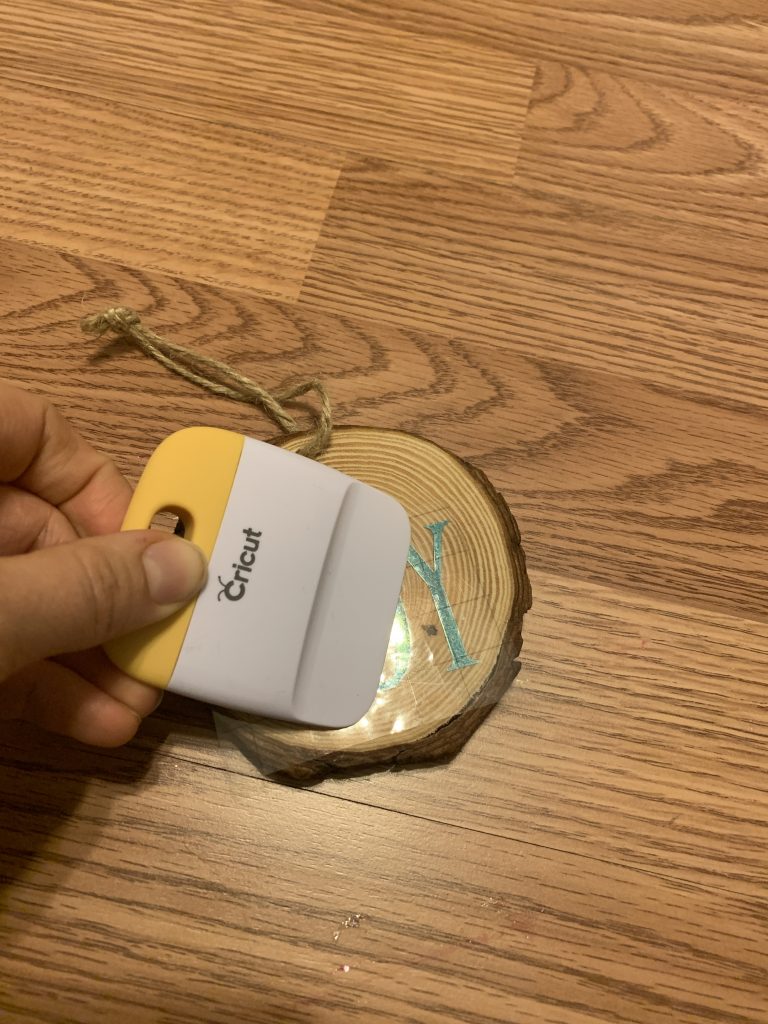
In order to do that, we used the scraper tool in order to get it to move from the vinyl paper to the transfer paper. 

Then, we placed where it wanted it on our wood piece and again used the scraper to get it from the transfer paper to the wood. 

After ensuring that all the pieces were moved from the transfer paper to the wood, we carefully removed the transfer paper, repeated with the word choose and then viola, done!  We did decide to use mod podge to seal even more because …kids…they are rough! 

What we were left with was a gorgeous hanging piece of wall art for our kid’s school room that they will love!  

They got so excited for how shiny it was. And they have even asked if they can make some for their friends. 

These types of easy projects make learning how to use your Cricut machine fun.   Here’s another idea that we did on a plant that needs just words added to Cricut Design Space and only one color of vinyl.  

Filed Under: Home, Parenting

How to Make Kid’s Canvas Name Bags with Large Cricut Easy Press

February 7, 2020 by Larisha Campbell Leave a Comment

This is a sponsored conversation written by me on behalf of Cricut. The opinions and text are all mine.


If you are looking for an easy first project with your Cricut Easy Press, then these Kid’s Canvas Name Bags are just the project you’ve been looking for to make. 

If you were like us the first time you saw your Cricut Explore Air 2 and Easy Press, you may have been a little intimidated or even nervous.  

Luckily, there’s easy projects to do that can make the process, quick, easy, and painless. 

The reason I wanted the easy press, is because I love the idea of vinyl projects; however, certain things, I wanted it to look like it was seamlessly on there instead of raised like you get with vinyl projects.  Luckily, Cricut makes brand new infusible ink vinyl that allows for this to happen perfectly. 

I know that most people like to do t-shirts for their first Easy Press project. It makes sense. I think most projects in general that people see are t-shirts, so it only makes sense that it must be an easy first project. 

However, I thought a canvas bag made more sense.  Why? 

  • Bags are stiffer/sturdier then shirts so less opportunity to move around or slip messing up the transfer
  • Don’t have to worry about sleeve and make sure they aren’t in the way
  • Allows for a little bit of error. 
    • If I did happen to slip, I’d be able to play off a slight blip in a bag. But a shirt, you could clearly tell when wearing. 

One of the reasons that I love using Cricut so much is that I am able to view tutorials that walk me through step by step what I need to do.  This project was no exception. 

I used this tutorial by Cricut to walk me through everything I needed to do. 

The first thing I needed to do was create my design in Cricut Design Space.  I just wanted names so I wrote the names and chose the font I wanted. I chose Wildflower for this project. I measured the space I wanted the bag to fit on and then expanded the letters in order to be accurate (in this case 9 1/2″ for Serenity and a little smaller for Storm). 

Pro Tip: The letters will not be touching when you initially type out the word.  In order to get them to touch, adjust the letter spacing.  Once you have them touching, click Weld on the bottom right. 

When it is time to print your project some quick tips for doing this type of project. 

  1. Make sure you click mirrored image. You need it to print this way so it goes on correctly to the bag using the infusible ink. 
  2. Since you are using infusible ink, if you are also using a Cricut Explore Air 2, you will turn your dial to custom and then select Infusible Ink as your material. 
  3. If you do not do #2, the machine will not cut through the entire material and you will not have a clean cut
  4. Make sure to follow the tutorial above, in regards to heating the item and rolling clean with a lint roller. 

Once your word(s) are cut, use your weeding tool to remove any excess material.  The only thing that should be left on the sticky side is your actual word. 

Use your weeding tool to remove any excess pieces around letters like O, T, S, and Y. *For reference, you can see the excess material in the y in the photo above that hasn’t been removed yet. 

Follow the steps in the tutorial above for layering order of the butcher paper and time and temperature settings. 

It’s really important in this step that you do not move the Easy Press and instead you keep it as still as possible.  Moving it can cause the ink to move. 

Voila! All done!  


We were so excited with how they came out! 

If you make one, share a picture with us on social media and tag us at @wereparents

Filed Under: Home, Parenting, Uncategorized

Unboxing our Cricut Explore Air 2 Machine and Easy Press

February 7, 2020 by Larisha Campbell Leave a Comment

This is a sponsored conversation written by me on behalf of Cricut. The opinions and text are all mine.


Before having kids, I was very crafty.  I would make blankets, paint, and more. There was rarely a time that I wasn’t being super creative doing something. 

After having kids, all of that sort of got put to the back burner, unfortunately. 

Every single year, I say that I am going to do more creative work.  Yes, I know having a website is creative, but it’s not the same. 

I didn’t want something that felt like work, I wanted to be able to sit down and really create things again. 

Here we are though with a 7 and a 4 year old and I still haven’t. 

Insert: Cricut. 

When Cricut reached out to us to see if we wanted to work together, I wish you could have heard the squeal coming from my house.  Maybe my neighbors actually did. 

I felt like it was the perfect opportunity to be able to combine my love of writing with my desire to get back into crafting and a creative space.  

And that is exactly what happened. 

See us unboxing our new Cricut Explore Air 2 and Easy Press

I had never had any type of machine like this even though it had been on my Christmas list for probably the last 3 or 4 years.  I always made excuses why also things should come before it. 

Read: I always put other things before my desire to craft again. 

I always say that part of that was my postpartum depression and subsequent realization that I have more than just postpartum depression and anxiety and it is something that will likely affect me the rest of my life. 

It’s taken until now to realize that one of the ways I can help myself with my depression is to get back to something I have loved for a long time and for me that’s crafting again. 

Why the Cricut family of products make for a great intro into crafting

I will completely admit that when I first opened the boxes and started looking around that I was completely intimidated. 

Oh. My. Gosh. 

There are so many things to learn. 

Full transparency: It hasn’t been exactly easy.  There are a lot of things to learn. 

The reason that I think the Cricut family of products (specifically the Explore Air 2 and the Easy Press) are a great intro into crafting is because there are a ton of resources available through Cricut to make sure that you create the perfect project every time. 

I remember being intimidated about where to even begin but through their resources and tutorials it has made it even more easier to figure things out. 

Don’t get me wrong, I have messed up and wasted material (from what I read this is common just in the beginning), but I quickly realized what I did wrong (hint: I didn’t read all the tutorial instructions). 

But overall, I have started having a lot of success with projects that I feel like I can start moving onto even more ideas! 

3 Tips for your first Cricut project 

  1. Pick an easy project. Something that is one color, with one cut.  Like labeling a canister in your kitchen.
  2. Have a weeding tool available. If it did not come with your machine, I recommend this being a first purchase. 
  3. Use Cricut Design Space to chose something that is already designed for you instead of making something yourself. 

Once you get the hang of things you can continue to create more and more projects with a harder learning curve, like layers or multiple color cuts. 

Did you recently get a Cricut Explore Air 2 or an Easy Press?  Leave a comment below and let us know what you made! 

PS…Can you comment below and let me know if it’s normal for my space to look like this once done a project LOL!

Filed Under: Home, Parenting

Santa HQ – A Family Experience

December 16, 2019 by Larisha Campbell Leave a Comment

Santa HQ is a fun and exciting immersive experience for the whole family to visit Santa Claus. Located at 15 malls throughout the US. Learn more by reading our experience.

Disclosure:  This Santa HQ post is sponsored by HGTV. Thoughts and opinions are 100% my own.

A few years ago, I didn’t even know if we were going to do Santa. Each year, I still question it in the back of my mind. I feel wrong to lie to them. However, the moments and memories that we’ve created around Santa have been completely worth it. 

Both girls eyes light up, their little voices glee with happiness, and their laughter brings everyone so much joy. I know in those moments that it’s so worth it.

For the last 4 years, we have been going to Santa HQ over at our local mall. The mall, located in Deptford, NJ, teamed up with HGTV to bring locals “Santa HQ“.

It’s a super fun and exciting holiday experience that the whole family will enjoy in addition to the traditional visit with Santa Claus. *Bonus: Santa in Deptford has a real beard 😉

What is Santa HQ?

As soon as you walk into Santa HQ you are immersed in all things Christmas holidays. Santa HQ works by guiding visitors through an immersive, interactive holiday experience with the use of state-of-the-art digital technology.

You have to absorb everything and be careful not to miss anything, but HGTV has worked really hard to pack in as much of the holiday spirit as they can in this experience. The first thing that happens is you get checked in (it’s better to have reservations).

Then you have four stations:

  • Naughty or Nice Meter
  • Santa’s Workshop
  • Santa’s Observatory
  • Finally, Santa’s Sleigh (this is where the big guy is sitting)

Honestly, it’s just such a fun and unique way to enjoy Santa.  I know growing up as a kid, I loved going to see Santa. However, I never wanted to stand in the mall lines.  The Santa HQ experience not only is a fun way to get into the holiday spirit, but it’s also great for breaking up the line so parents aren’t waiting for an exorbitant amount of time. The elves (staff) and Santa are amazing with the kids and it’s truly just so great.

Plus, you have to see the innovative way that mobile apps, social-media-ready opportunities and augmented reality are woven into the Santa HQ experience. 

See a few sneak peaks: 

How much does it cost to do Santa HQ? 

The Santa HQ experience is completely free of charge to go through the set-up and even speak with Santa.  The only thing that you potentially have to pay for is photos and that is completely optional.  (They are super cute to look back on every year). 

Can I just walk in to Santa HQ or are reservations a must?

You can absolutely just walk in to Santa HQ. However, reservations to Santa HQ are preferred. Trust me, you want a reservation. Especially if the only time you can go is on a weekend, it can get quite crowded. 

After all, Santa HQ is completely free.  You only pay if you want to purchase pictures.  So, it can fill up pretty quickly. Reservations are easily made at Santa HQ.

Also, you can even pre-pay for your photo package. Santa HQ is currently at 15 shopping locations in California, New Jersey, Chicago, NYC, DC, and more. See if there’s a location near here by visiting the Santa HQ site.

The Santa HQ Experience 

After you check in with the concierge, you’ll head to meet your first elf. You’ll stand on the Naughty or Nice O’Meter and see if you’ve been naughty or nice (hint: it’s always nice!). The kids name will pop up onto the top of the list that shows they’ve been nice!

Next, they are invited to sit down at a holiday photo set-up at “The North Pole”. The elf taking the pictures stages your family to take some pretty adorably amazing photos at the North Pole before they head off to their next adventure.

Next, families are invited to visit Santa’s workshop where they will find Santa’s Elf Academy.

This year, each kid gets to make their own Elf ID card. 

They put their face inside a little oval and then you have the option to mail yourself the ID Card right from Santa’s workshop.  It’s fun to do this because of the end of the experience they get a set of Elf ID cards in the activity workbook from Santa HQ. Our girls loved having their own to go along with the “real ones” as they called them. 

There’s also a Magic Mirror that they can play with that allows for them to look like an elf and change outfits. 

Then it’s time for Santa’s Observatory.

Families head for a fun adventure to the Elf-Ray Vision Station where children use tablets to project elves working, Santa’s sleigh and more.

The tablets come alive and kids will be super intrigued at how it looks like nothing is on the wall but when you hold up the tablet, things are there.  It’s pretty nifty actually. 

Finally, it’s time to see the big jolly guy and families end the experience with the traditional Santa Claus photo-op.

Just like the shopping mall Santa experience when you were little, this is the best part.  You get to see and speak with Santa and afterwards you get a little activity book. 

Ready? If you want to spend less time in line, then you will want to purchase a Fast Pass today! Visit Deptford, NJ’s Santa HQ, to make reservations, grab your fast pass and pre-purchase a photo package. 

Book your Santa HQ Reservations Now!

Santa HQ in Deptford, NJ is open 9am-9pm and Christmas Eve 9am-6pm.

Don’t worry, if you didn’t snag a fast pass, there are still kiosks available for you to purchase photos that day too!

Here’s some photos from the last two years.  We love that it’s the same Santa Claus, so they can have a similar memory!

Holiday Giving with Santa HQ 

Also, when heading over to Santa HQ consider bringing a toy to donate.  Visitors at Santa HQ, in conjunction with HGTV’s Help Through Holiday Giving Drive, are encouraged to donate a new, unwrapped toy. Toys go to benefit local organizations like Toys for Tots, Salvation Army Angel Tree, Forgotten Angel Tree and more. However, this is not required.

Check Out Even More By Watching the Video Below:

Book your Santa HQ Reservations Now!

Filed Under: Home, Parenting, Travel Tagged With: christmas, holidays, santa

Everything You Need to Know about the Miko 2 Robot

November 27, 2019 by Larisha Campbell Leave a Comment

One of the best gifts for kids this year is the Miko 2, a fun and interactive learning robot! Check out everything you need to know about the Miko 2 Robot. 

This post is sponsored by Miko 2. 

We have officially reached the point in life where we are both adamant that our kids need no other toys. Very few exceptions are made to that rule. If you are like us, then you are going to want to consider the Miko 2. 

Kids are overwhelmed and inundated with toys constantly today.  Not only that, but the over stimulation of constantly receiving more and more gifts usually leaves things unplayed with. 

We really prefer to gift our kids things that fall into one of three categories: 

  • Educational gifts (games, snap circuits, clay)
  • Experience/Travel gifts (museum memberships, theatre tickets, trips)
  • Outdoor gifts (new bikes, skates, sports balls, climbing equipment)

If it doesn’t fit into one of those categories, they usually don’t get it and very few exceptions are made.  

Before you come into the comments, trust us, that our kids aren’t deprived of anything. They have plenty of toys and they are also fully aware of why and understanding. Very rarely at this point do we get push back from them. 

Luckily, there are still really cool ways to stick to our preferred categories of gifts and still have really excited and happy kids. 

Introducing Miko 2

Miko 2 is a fun and friendly robot that uses conversational learning to educate and entertain.  So kids, while having fun, are still learning a lot of information from their new friend. 

Miko 2 weighs just under 2 lbs!  Don’t let its small size fool you though.  It’s packed full of fun! 

Watch our fun video with Miko 2:  

What are the recommended age ranges for Miko 2?

Miko 2 is recommended for ages 5 to 10 years old. 

There are no small parts and it comes completely assembled.   It’s perfect for our 6 year old, but our 4 year old still really enjoys it. And it definitely can have educational benefits for children older than 10 as well. 

What can Miko 2 do?

Especially because we homeschool, we are super interested in learning toys.  Miko 2 is an amazing homeschool tool; but even if you don’t homeschool it is super fun! 

Need help with a homework question? Miko 2 can probably answer. 

Need a few minutes of a break from homeschool or does your kid need to be occupied while you finish up dinner?  Let Miko 2 do a dance party!

Want to set a timer so your kid knows how long to brush their teeth? Miko 2 can set a timer!  

There are a ton of things that Miko 2 can do and it’s even updated every 15 days to add even more!

What else can Miko 2 do?

There are so many things Miko 2 can do, it’s impossible to list them all; however, some of the ones we have found to be fun are: 

  • Have a dance party or play songs
  • Play soft music (great for background noise in homeschool room or for noise at bedtime)
  • Help with spelling
  • Gives definitions of words
  • Helps with calculations 
  • Tells fun facts
  • Tells jokes, riddles, and tongue twisters
  • Gives child friendly news and weather information
  • Sets alarms
  • Does multiplication 
  • Can be asked “where”, “why”, “how”, “who” and “which” type of questions
  • Can do measurements and conversions 
  • Teaches colors and shapes

Is Miko 2 safe?

Yes! Miko 2 is COPPA compliant and never stores any personal information. It uses end-to-end data encryption to ensure your child and your privacy are safe.

Miko 2 is controlled through an app with parental controls, so you are always in control.  It even allows you to move Miko 2 around via the app which can totally freak your kids out if they don’t know that. 

Another fun feature is that you can use the app to “call” your kids via a video chat. This is super fun if you are away at work or on a trip without them so they can see you. 

Purchasing Details for Miko 2 

Miko 2 is available for the first time this holiday season to North American audiences. 

It retails for $399.  Currently for a limited time, Black Friday week specials, it’s 50% off and costs just $199.  After the holiday special, use code “Larisha25” for $25 off the purchase price. The discount will not work with any other discounts. 

Order by the end of November and guaranteed shipping before Christmas. 

Shipping is free. 

Purchase at Miko.ai today! 


Pin this for later:

Filed Under: Home, Parenting Tagged With: parenting

Balancing Screen Time in a Tech Driven World

September 19, 2019 by Larisha Campbell Leave a Comment

Balancing Screen Time isn’t always easy but with the right tools and monitoring, the right balance can be achieved for every family. 

This post was sponsored by Google in partnership with the Forward Influence Network. All thoughts and opinions are my own.

I’m going to be real honest with y’all. Balancing screen time is not something I am always good at if we are being real with each other.  

I mean they are normal kids who want to watch TV and play on their computers, but beyond that I also work from home (sometimes I need them distracted) and we homeschool (they are both in online programs).  When you add those things together, it’s easy to see how too much screen time can add up quickly.  

But there are ways that we are working to ensure that they are having adequate balance in their lives. 

In turn, I’m learning that I too need more balancing in my own life. Isn’t it funny when that happens?  We sometimes realize that what we are doing for our kids is actually benefitting us as well?  It’s a win-win in those situations if I do say so myself. 

Being that I work in a tech driven world, it’s obvious to see how quickly my own time can add up. 

So what are we doing and how are we balancing everything?

First, I’m going to be upfront and say that not every day is perfect. Let’s just get that out of the way. This isn’t one of those posts where I’m going to say that everyday we are nailing it. Because that’s not real life.

But these tips will help on *most* days and that’s better than no days.  Am I Right?

Why is it important to work on Balancing Screen Time

At the end of the day, what really matters to you?  It’s important to find balance in your digital wellbeing because, if we are being honest, most of the things you are doing on the computer/phone/tv aren’t what is important.  

This isn’t to say your work isn’t important.  But 8/10 times you scrolling through social media or binge watching 10 episodes of the newest season of your favorite show isn’t going to help your wellbeing any (or your kids). 

What is going to help your overall wellbeing is getting outdoors more, spending quality time with those that you love, and ensuring that your home space doesn’t feel overwhelming to you. 

When you work on balancing screen time and in turn your overall digital wellbeing, then you improve your overall mental health as well. 

Whether you are working to  minimize distractions or unplug more often in order to be with your family, Google offers tools that can help. You can visit wellbeing.google to learn more.

5 Ways to Work on Balancing Screen Time for Kids (and adults!)

The first three ways are just suggestions and there can be broad ways to think outside of the box on both of them. 

  • Have a designated family time nightly that doesn’t include screens

    • For us, this means no phones at the dinner table or around our bedtime routines.  
    • Most nights it includes family reading time where I read a chapter book to them for a set amount of time or chapters
    • It can also include family game nights where we play board games or cards or do some other type of activity
    • Sometimes it also includes taking a walk together as a family 

No matter what your family time activities include, try to be intention that the hours surrounding dinner and bedtime don’t include screens. 

  • Commit to outdoor play time

    • If you are a stay at home parent, this could be a set number of hours you spend outside daily
    • If your children are in school, send them outside to play or take them to a park for 30-60 minutes after school every day to get them to decompress naturally from the stresses of school 
    • Pick a hobby outside together – maybe it’s planting flowers or a garden or building a new play area.  Find ways that you can enjoy each other together
    • Or find new outdoor activities to try together – like canoeing or snowboarding

  • Sign your kids up for sports or some extracurricular activity

    • We enjoy soccer and maybe gymnastics depending on the time of the year it may be swimming
    • However, if your children aren’t interested in sports, find anything screen-free activity that can do. Maybe it’s art classes, lego clubs, baking course, or music lessons. 
    • The library is a great resource for free screenless activities that your children can participate in. 

And finally, the last two are more concrete ways of limiting and balancing screen time for both your children and yourself. 

  • Set Rules

No matter what device you are using – tablet, phone, computers, speaker devices, etc – you should have rules. 

It can be as simple as no devices in your room and only 2 hours of screen time a day.  Or more detailed rules like no devices after 8pm or only TV on the weekends. 

Whatever you do is up to each individual family and will even vary between ages of your children. 

We recently learned about Google’s Digital Wellbeing Family Guide and think that everyone should print it out and fill it out the Family Guide poster with their families.  It’s such a great tool about screen and being better about your time and devices for the entire family! 

We have started to fill out our own and know that as our children grow older it will change, but it could be a great thing to fill out at the start of every school year.   


  • Set Limits

This is a big one, especially for teens and through adulthood, we really need to have limits and sometimes we need reminders of that. 

One limit app that I am really loving is the Youtube take a break reminders.  You can set in a time limit and when you reach that it will reminder you and suggest that you take a break.  We all know how easy it is to just keep clicking.  This is even useful for younger kids who love watching their favorite people like Ryan’s Toy Reviews or JoJo Siwa. 

Google’s Family Link also allows you to set daily time limits and bedtime hours so you don’t use your devices after those times. You can even remotely lock a device like your teen’s computer so they can’t use it after the limits that you set. 

I’m sure you may get a little backlash or some sass if you’ve never set limits before, but it’s up to us all to do better, be more aware and more present for everyone around us. 

To discover more tips and tools, visit wellbeing.google to find a balance with technology that feels right for the whole family. 

Pin this to save for later: 

Filed Under: Home, Parenting, Uncategorized Tagged With: parenting

  • 1
  • 2
  • 3
  • …
  • 16
  • Next Page »


We're Parents is all about cooking and traveling our way through imperfect parenting. Learn More

SUBSCRIBE TO OUR WEEKLY NEWSLETTER & GET PARENT & ME COLORING SHEETS

Connect With Us

We're Parents is a unique mom and dad natural parenting blog focusing on topics such as breastfeeding, babywearing, and car seat safety. You'll also find Delicious recipes, inspired travel recommendations, and more as you journey with us through parenting. Learn More…

VIEW OUR PRIVACY POLICY

Even More Recent Posts

We’re Parents is a participant in the Amazon Services LLC Associates Program, an affiliate advertising program designed to provide a means for sites to earn advertising fees by advertising and linking to amazon.com

Copyright © 2026 · Foodie Pro Theme by Shay Bocks · Built on the Genesis Framework · Powered by WordPress

Rate This Recipe

Your vote:


A rating is required
A name is required
An email is required